
The Infocare Document Service is a reusable PowerSchool extension for collecting and managing student records. It combines PowerSchool-hosted pages with a separate service that the school controls.
At a glance
The document service at a glance
- ✓Parent Portal uploads — Families submit or replace required documents for the currently selected student.
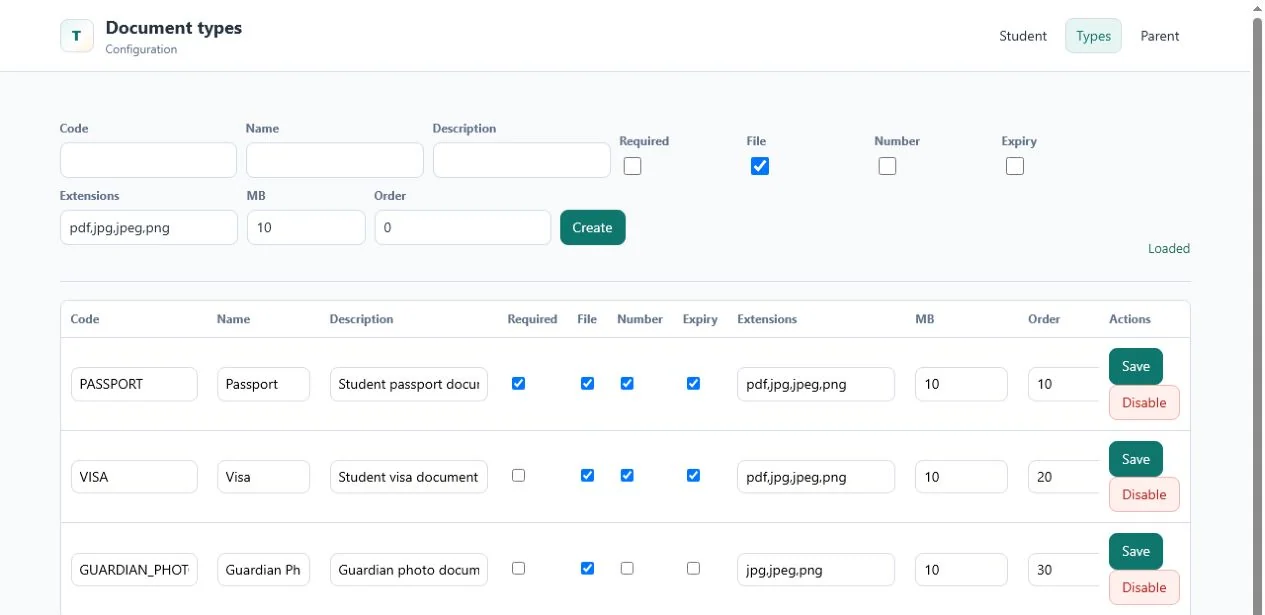
- ✓Configurable requirements — Schools define document types, required fields, file formats, size limits, and display order.
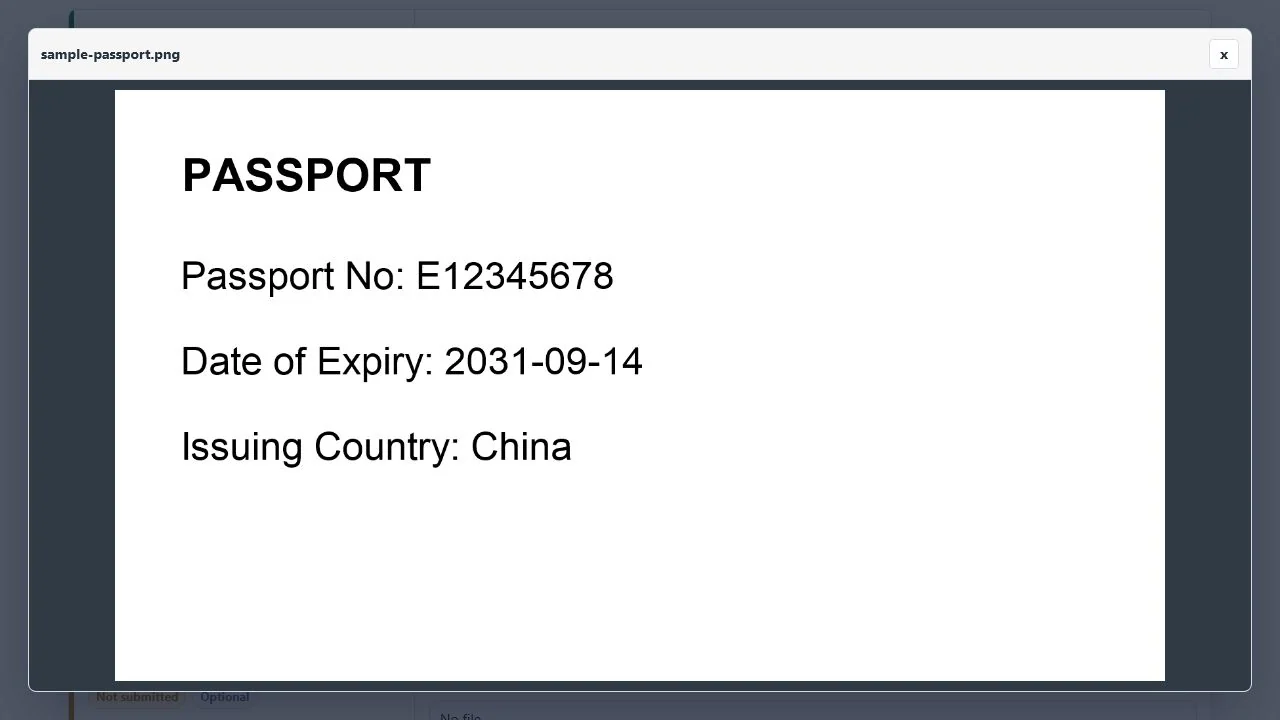
- ✓Inline preview — PDF, JPEG, and PNG files can be reviewed directly in the page and enlarged when needed.
- ✓OCR-assisted entry — Document number and expiry date can be extracted, reviewed, and corrected by a person.
- ✓Expiry reminders — Configurable schedules identify missing, expiring, and expired records before they become urgent.
- ✓Admin exports — Filtered batches produce a ZIP package with an optional CSV manifest for trips, audits, and reviews.
01
Student documents were scattered across inboxes, drives, and local folders
Schools routinely need current passports, visas, identity records, birth certificates, and guardian documents. The collection process often begins in PowerSchool but leaves the system as soon as a parent sends an attachment by email.
- No shared status
Parents cannot tell what is missing, while staff maintain separate trackers to see what has arrived.
- Manual expiry checks
Document dates are copied into spreadsheets and reviewed only when an event or deadline approaches.
- Risky bulk handling
Field-trip and compliance packs are assembled manually from many storage locations.
02
A structured document workflow that starts inside PowerSchool
The custom pages retain the familiar PowerSchool navigation and student context. The document module handles the business workflow: configured requirements, uploads, metadata, preview, version history, OCR review, reminder tracking, compliance reports, and exports.
PowerSchool remains the source of truth for student, parent, and administrator identity. The independent service becomes the source of truth for document configuration and document lifecycle data.
Document files and metadata stay on infrastructure chosen by the school. No custom PowerSchool business tables are required, and physical storage paths are never exposed to users.
03
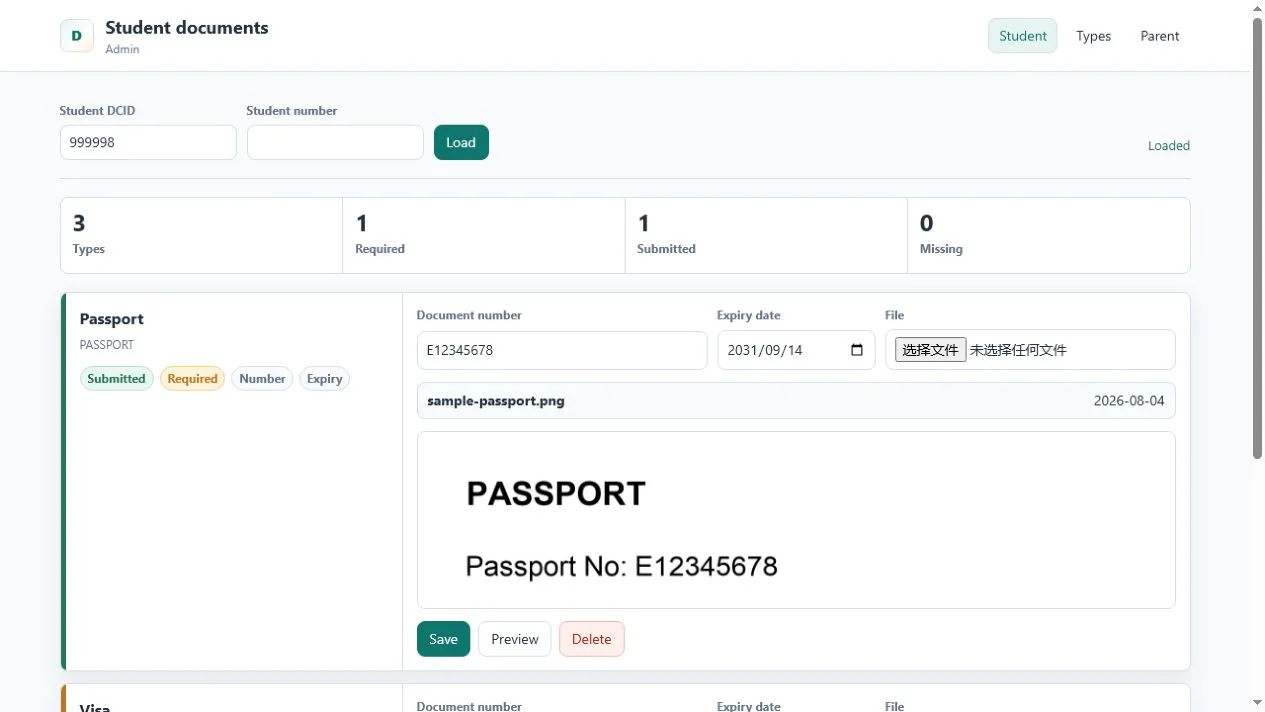
One place to upload, update, and review every requirement
Each configured type appears as a clear requirement with submission status, metadata fields, and the relevant actions. Parents work with their selected student; administrators can open the same workflow from a student profile.
04
Automation helps staff act earlier without removing human review
When OCR is enabled, an uploaded image or first-page PDF is queued for text extraction. Suggested document numbers and expiry dates are shown for confirmation, and staff can correct low-confidence results.
- Collect
A parent or administrator uploads a supported document.
- Extract
OCR identifies candidate text and common metadata values.
- Review
A person confirms or corrects extracted values before relying on them.
- Act
Reports, reminders, and filtered exports use the verified document data.
For administrators, a compliance report distinguishes submitted, missing, expiring, and expired items. The same filters can create a ZIP export with a CSV manifest, while reminder rules record each delivery attempt without attaching sensitive files to email.
05
A small PowerSchool footprint with an independent service behind it
The implementation is deliberately modular so it can be adapted for future PowerSchool customers and different school infrastructure choices.
- PowerSchool custom pages: admin and Parent Portal pages preserve PowerSchool navigation and launch the correct student context.
- REST API: a TypeScript and Express service owns document types, uploads, previews, OCR review, reports, reminders, audit events, and export jobs.
- External data layer: MySQL stores document metadata and workflow state; files remain in protected school-controlled storage.
- Controlled file access: previews and downloads use API routes with file validation, generated filenames, size limits, MIME checks, and SHA-256 hashes.
- Auditable operations: upload, replace, preview, download, delete, OCR confirmation, reminder, and batch-export events can be recorded.
- Production security path: deploy behind HTTPS and validate PowerSchool-backed sessions, parent-student relationships, administrator permissions, and school scope on every request.
06
Less document chasing, clearer accountability
- For families
A visible checklist, direct upload, and document preview make the request easier to understand and complete.
- For registrars
One student view replaces inbox searches and disconnected spreadsheets.
- For trips and compliance
Filtered reports and batch packages turn last-minute collection into a repeatable process.
- For IT and data protection
The school controls storage, retention, authorization, backups, and the boundary around sensitive files.
07
Common questions
PowerSchool Document Service FAQ
Are document files stored inside PowerSchool?
No. PowerSchool supplies the user and student context, while the document service stores metadata in external MySQL and files on school-controlled storage.
Can each school define its own document types?
Yes. Types can define required status, file rules, document number and expiry requirements, permitted extensions, size limits, ordering, OCR behavior, and additional metadata fields.
Can parents preview an uploaded document?
Yes. PDF, JPEG, and PNG files can be viewed in the page and enlarged. Download access can remain restricted according to school policy.
Does OCR make the final decision?
No. OCR suggests values with a review status. A parent or administrator can confirm or correct the document number, expiry date, and configured metadata.
How do expiration reminders work?
Schools can configure schedules for missing, expiring, or expired records. Delivery history is recorded, and email directs recipients back to PowerSchool instead of attaching a sensitive document.
Can administrators download documents in bulk?
Yes. Authorized staff can filter the compliance report by student, type, status, and expiry date, then generate a ZIP package with an optional CSV manifest.
What is needed before production use?
The service should run behind trusted HTTPS with PowerSchool-backed authentication, parent-student authorization, administrator scope checks, approved email configuration, backup procedures, retention rules, and tenant isolation where multiple schools are supported.
PowerSchool custom development
Want a PowerSchool document workflow that fits how your school operates?
Infocare helps international schools design practical PowerSchool extensions for enrollment, compliance, student support, reporting, and data governance.
Talk to Infocare