

A kindergarten day is full of small moments that matter. A teacher notices something new. A parent wants to understand how the day went. Over a term, those observations help tell the story of a child’s development.
Benenden Kindergarten Guangzhou (BKG) uses Infocare’s OnePortal to bring these moments together in its Parent Portal. Teachers can connect an observation with learning goals and share it with families, while the school builds a record for assessment over time.
Kayla Leung shared the school’s experience at ACAMIS at Keystone Academy Beijing. Her presentation, co-authored with Jegan Chen, began with the problem this connected approach addresses: teachers recording the same information more than once.
The starting point
Nine hours with a child.
Then the paperwork.
Kayla’s sharing began with a familiar scene: a tired teacher has spent nine hours with a child, then faces a paper form asking her to repeat information she has already typed three times. The work continues long after the moment has passed.
One observation should not mean repeated paperwork.
BKG had tried paper registers, generic apps, spreadsheets and word of mouth. Each served a purpose. Paper offered reliability but little searchability. Spreadsheets held data without carrying it through a workflow. Conversations were fast, but left no lasting record. The missing piece was a connection between them.
For kindergarten, that connection needs to reflect the frequency, detail and care involved in communication with families.
Infocare’s role
School needs, connected through OnePortal.
Infocare helps BKG address its communication and assessment needs through OnePortal. The school’s kindergarten context shapes the experience: teachers need to capture detailed observations during a busy day, and families need a familiar way to follow and respond.
OnePortal brings these tasks into a connected workflow within a WeChat Mini Program. A daily observation can support both parent sharing and assessment, while practical services such as leave, appointments and activity registration sit within the same parent experience.
More use from each observation.
A recorded moment can carry learning context, reach the family and contribute to a term report. Its value continues beyond the daily update.
School life in one familiar place.
Updates and school services come together in WeChat, giving parents a common starting point for understanding the day and taking action.
The OnePortal solution
One observation can carry further.
BKG’s starting point was that a teacher’s daily observation is already useful evidence for assessment. Through OnePortal, capture, curriculum context and parent sharing connect in a four-step workflow, allowing observations to accumulate into a term report.
Daily capture to term reports
Capture it while it’s happening.
The teacher records an observation on the spot, keeping the daily moment at the centre of the process.
Give the observation a connection.
Link the observation to a learning domain and target, so it can also contribute to assessment.
Share the day with home.
The parent sees the moment on the same day, bringing the family into the child’s daily experience.
Let the moments build a story.
Daily observations accumulate over time and become part of the report, connecting everyday capture with term assessment.
This is the practical improvement OnePortal supports: the observation used to share a child’s day also contributes to the longer record of their development. Family communication and assessment can build on the same daily evidence.
OnePortal at BKG
Everyday connections, on screen.
BKG’s app designs show how the OnePortal experience takes shape around everyday use: a place to record a moment, a home screen that brings services together and a view of the daily routine.
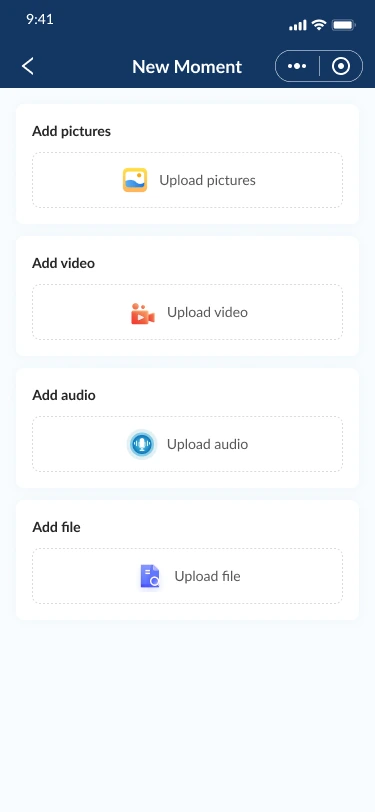
A moment, recorded.
The New Moment view provides places for pictures, video, audio and files.
View full screen : New Moment (opens a new tab)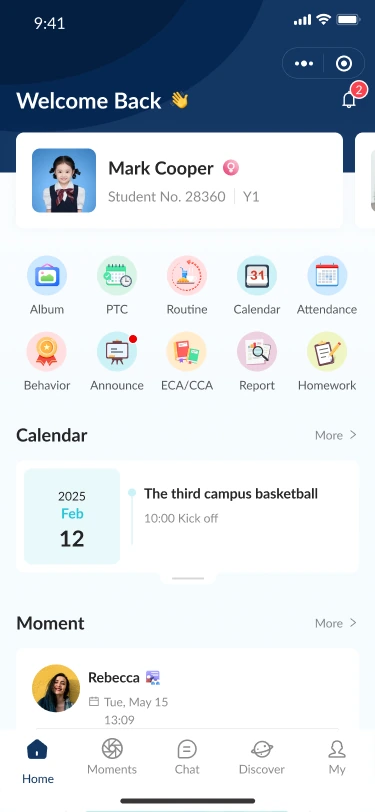
A familiar way in.
Service shortcuts, calendar items and Moments share a single starting point.
View full screen : Home dashboard (opens a new tab)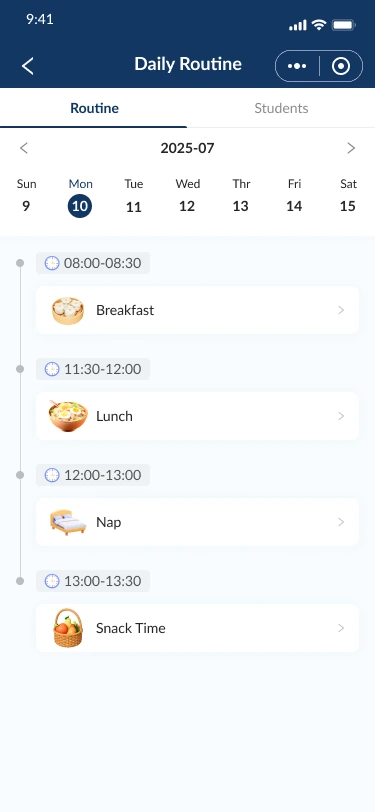
A day, made visible.
A dated timeline gives everyday routines a clear, consistent structure.
View full screen : Daily Routine (opens a new tab)App design previews from the supplied Figma file. Content is shown as it appears in the designs.
The parent experience
One child’s day.
One familiar starting point.
For families, the principle was simple: a parent should not need different apps to follow one child’s day. BKG’s OnePortal experience uses a WeChat Mini Program to make access familiar and avoid asking parents to install another application.
BKG’s implementation brings 10+ modules into OnePortal, covering daily routine, Moments, chat, attendance, leave, activities, registration and payment, appointments, announcements and assessment. Teachers and parents have separate dashboards connected to the same child.
A place to follow and respond.
Daily updates sit alongside the practical interactions that help families take part in school life.
Access shaped around responsibility.
Distinct permissions support the responsibilities of homeroom teachers, academic administrators, administrators, nurses and gate staff.
Homeroom teachers work with their own classes. Academic administrators configure learning domains, targets and criteria, and generate assessment reports. Other roles access the records relevant to their responsibilities, including health tracking and leave records for entry and exit.
Refining the OnePortal experience
Improvements in everyday tasks.
The improvements highlighted in Kayla and Jegan’s sharing show where OnePortal can make a practical difference. Batch posting and assessment scoring support teachers handling repeated tasks, while reminders and confirmation steps help parents recognise what needs attention.
For teachers
- Relationship labels in chat
- Batch posting of Moments
- Batch assessment scoring
For parents
- CCA/ECA registration reminders on the homepage
- A confirmation pop-up for leave
- Class groups and family groups
These refinements make Infocare’s role visible in the daily experience: OnePortal supports the school’s workflows through specific changes to how teachers complete tasks and how parents take part.
Lessons from BKG
Three ideas other schools can use.
Start with the pain.
Identify the repeated task or missing connection in a real school day. BKG’s story began with a teacher entering the same information again.
Design for the least tech-savvy user.
Make the entry point familiar and the next action clear. The parent experience helped guide BKG’s choice of a Mini Program.
Measure before and after.
Let the numbers speak. Agree on what to measure when planning a change, so the school can evaluate its effect.
Looking ahead
Faster capture. More insight.
The next steps outlined in the ACAMIS sharing are voice input and AI-assisted report drafting: easier capture of observations, followed by support for identifying performance trends and growth insights from daily Moments.
Planned enhancements shared at ACAMIS 2026.
BKG’s story shows what Infocare’s OnePortal brings to a school’s daily work: observations that support family communication and assessment, a familiar WeChat entry point for parents, and workflows shaped around the responsibilities of school teams. The connection begins with a teacher noticing a moment and continues as the school builds a child’s story over time.
About this story
Adapted from Building a Seamless Home-School Ecosystem: The Benenden Kindergarten Guangzhou Parent Portal Story, by Kayla Leung and Jegan Chen, October 2026. Shared by Kayla at the ACAMIS Technology Conference at Keystone Academy Beijing. App design previews are taken from the supplied BKG Parent Portal Figma designs.