
The goal is simple: replace scattered notes and separate spreadsheets with one reliable behavior record inside PowerSchool SIS.
The module is designed for school operations, so it supports fast entry, consistent categories, role-aware visibility and clean reporting.
At a glance
The behavior module at a glance
- ✓Positive and negative records
- ✓Single or batch entry
- ✓Follow-up history
- ✓Volunteer-hour totals
- ✓Admin overview
- ✓Student-level history
01
The problem: behavior data lived everywhere except the student record
In many schools, behavior records start as classroom notes, email threads, homeroom spreadsheets or messages between staff. Positive behavior may be celebrated informally, while negative behavior may be documented only when an incident escalates. Volunteer hours often sit in another tracker entirely.
That fragmentation creates predictable operational pain. Teachers repeat the same entry work. Grade-level teams miss context. Administrators cannot quickly see patterns. A student may have several follow-up conversations, but the history is hard to connect to the original record.
- Record format changes from person to person.
- Volunteer and service hours require manual consolidation.
- Follow-up actions lose context across teams.
02
The solution: a structured behavior workflow inside PowerSchool
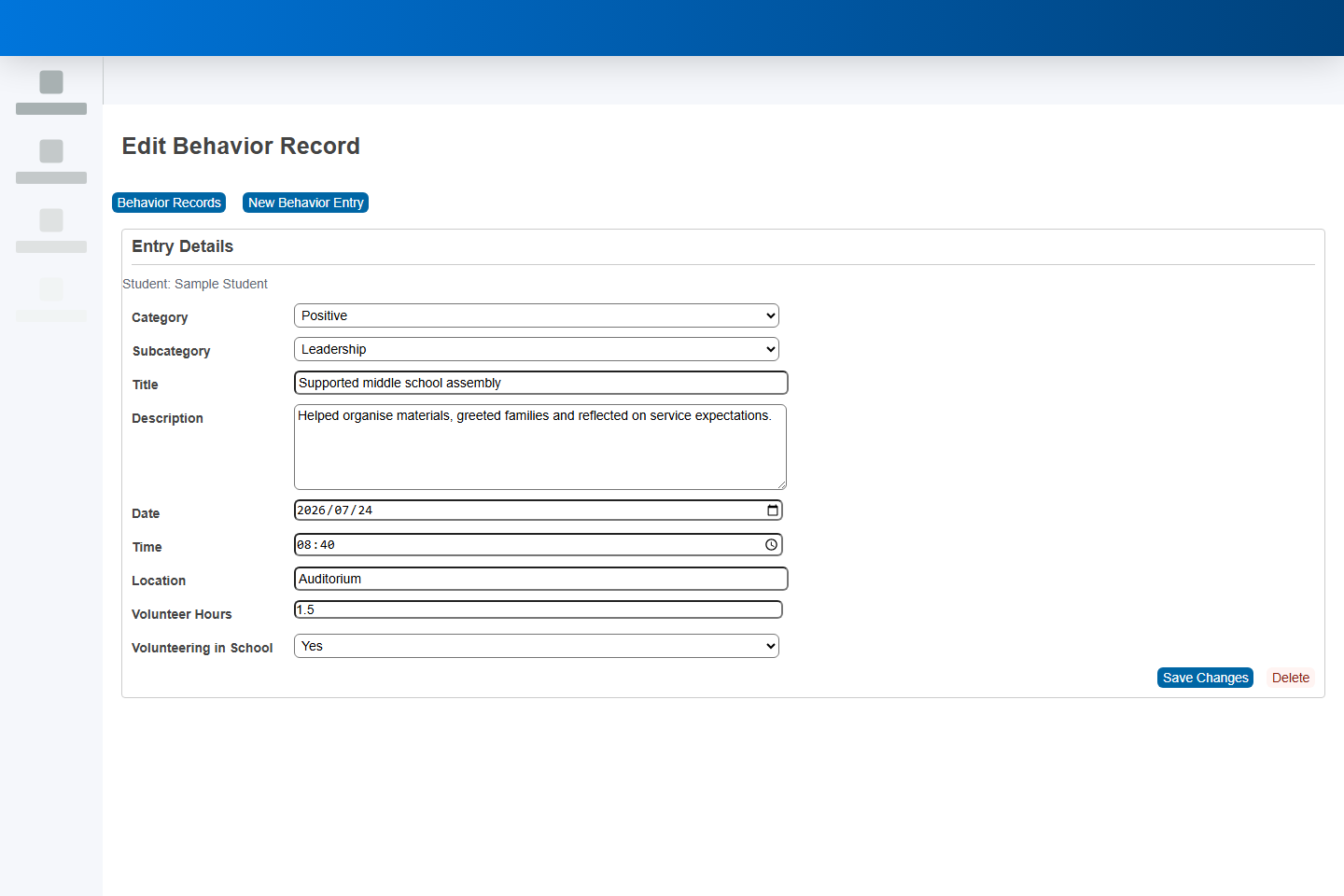
Infocare built a PowerSchool behavior module that keeps staff in a familiar system while adding the structure the workflow needs. The entry form captures category, subcategory, title, description, date, time, location, selected students, recorder, volunteer hours and whether the volunteering happened in school.
The form also responds to the selected subcategory. When Volunteer Hours is selected, the hour field becomes relevant. For other subcategories, staff can focus on the behavior description and follow-up work without extra fields in the way.
For batch activities, one entry can be applied to a group of students. If a class joins a five-hour service project, the staff member selects the students once, enters five hours once and each student receives the same structured record.
The module intentionally records positive behavior with the same care as negative behavior. That helps schools build a fuller picture of student growth, not just a list of concerns.
03
How the workflow looks for staff
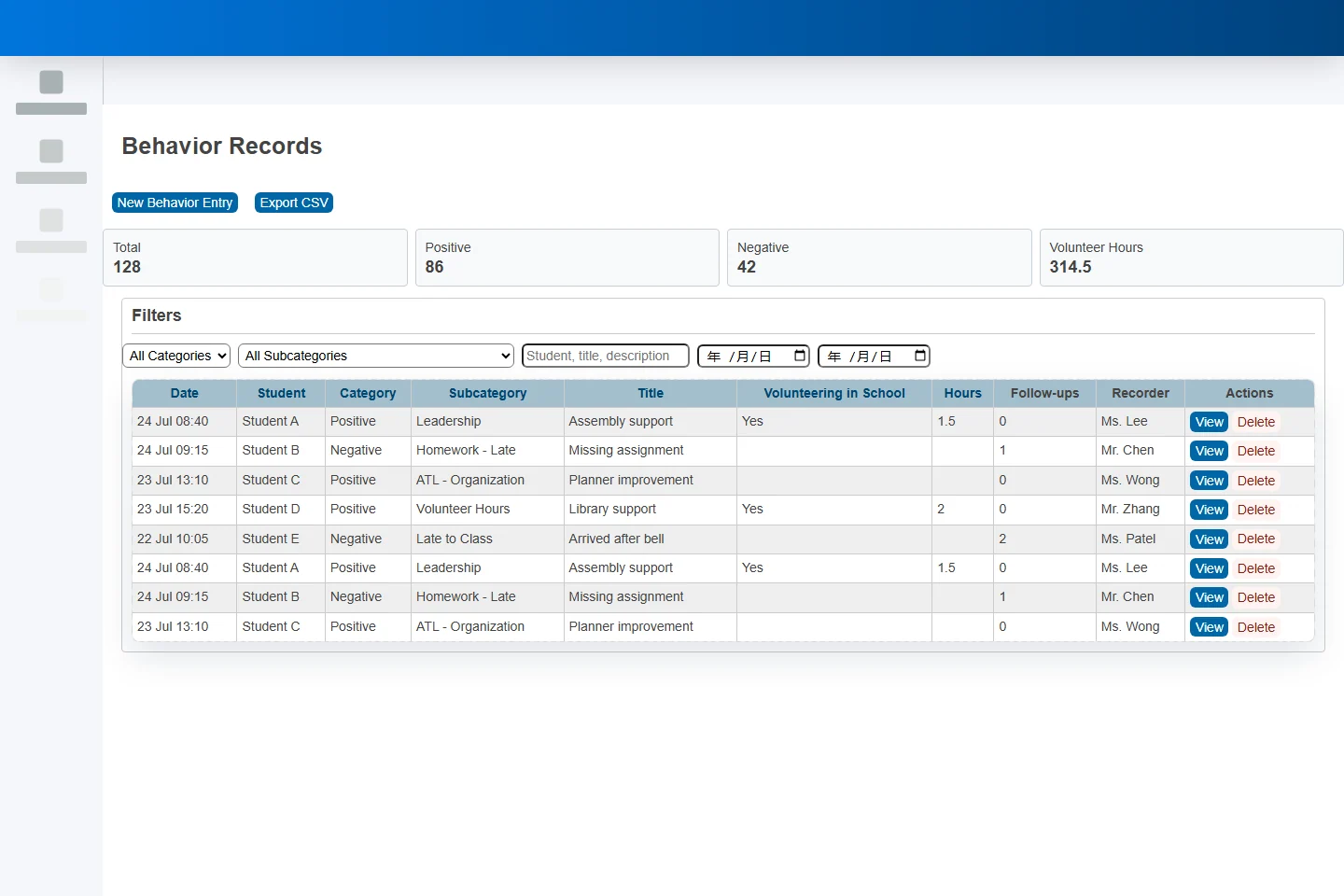
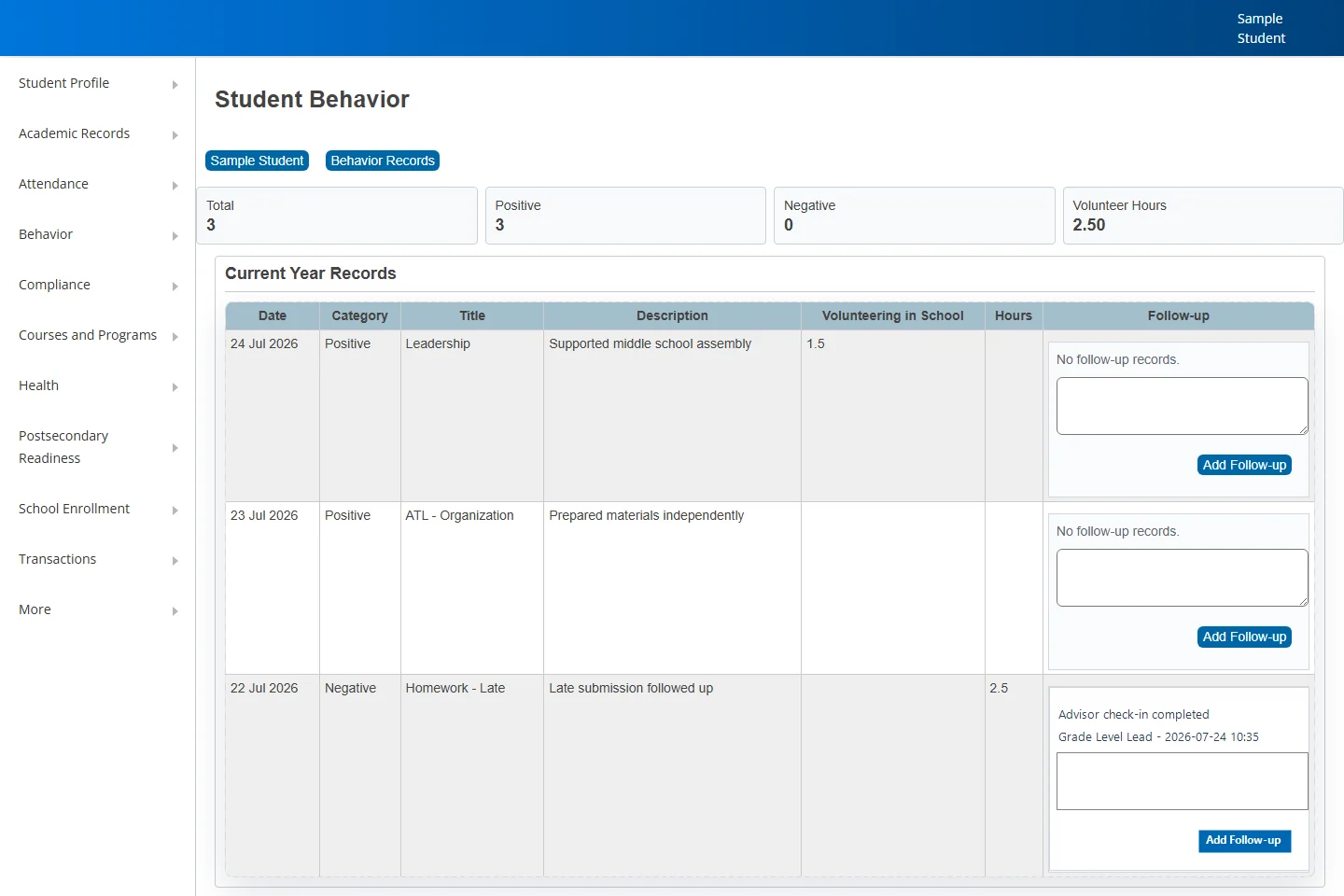
The screenshots below use anonymised sample data from a test PowerSchool environment. They show the three core surfaces: the admin overview, the structured entry form and the student-level behavior history.
04
High-level technical approach
The user experience is delivered through PowerSchool custom pages so staff can work from familiar admin and teacher screens. The data model uses behavior-related custom tables for entries and follow-up records, with controlled values for categories and subcategories.
For record updates and deletes, the module uses a server-side service rather than direct browser writes. The ps-infocare-backend-service exposes behavior APIs through the school PowerSchool domain, validates the request context and writes back through the PowerSchool API path. This avoids direct Oracle dependency for edit and delete operations while keeping a clean permission boundary.
- Custom PowerSchool pages for admin entry, teacher view, overview, edit and student profile history.
- API-backed update and soft-delete actions through a secure Infocare service layer.
- Role-aware access rules: district administrators can manage all entries, school office and admin users are scoped to their school, and teachers are scoped to students in their sections.
- Follow-up records are appended as a timeline with recorder and timestamp metadata.
- The design leaves room for later notification rules without forcing that workflow into the first release.
05
The value for school teams
The biggest value is not just a new form. It is a shared operating rhythm. When behavior records have consistent structure, staff can spend less time interpreting scattered notes and more time supporting students.
- For teachers: faster entry, clearer student selection and less duplication when a whole group joins the same activity.
- For administrators: a central overview with filters, export, edit, delete and volunteer-hour totals.
- For pastoral and grade-level teams: better continuity because follow-up notes stay connected to the original record.
- For students: a more balanced record of growth, including positive contributions and service, not only corrective incidents.
- For school leadership: cleaner data for trend review, policy reflection and programme improvement.
Sources and methodology
How this article was prepared
This article combines Infocare’s PowerSchool custom-development and integration work with observations from an anonymised test environment. Product capabilities, permissions and implementation requirements can vary by PowerSchool environment, version and school configuration.
06
Common questions
PowerSchool behavior module FAQ
Can the subcategories be changed for a school?
Yes. The module uses controlled subcategory lists, so a school can align them with its behavior policy, ATL language, IB learner profile language or internal pastoral framework.
Can teachers create records?
Yes, where the environment permits the write path. In stricter PowerSchool environments, teacher-facing pages can view rosters and records while write-back is routed through a server-side API or proxy with the correct permissions.
Does delete remove the record permanently?
The recommended approach is soft delete. This removes the record from normal views while preserving auditability and reducing the risk of accidental data loss.
Can parent or student notifications be added later?
Yes. The current workflow can be extended with rule-based notifications, such as weekly summaries or threshold-based alerts, after the school confirms the communication rules.
PowerSchool custom development
Want a PowerSchool workflow that fits how your school actually works?
Infocare helps international schools design practical PowerSchool extensions for student support, reporting, operations and data governance.
Talk to Infocare